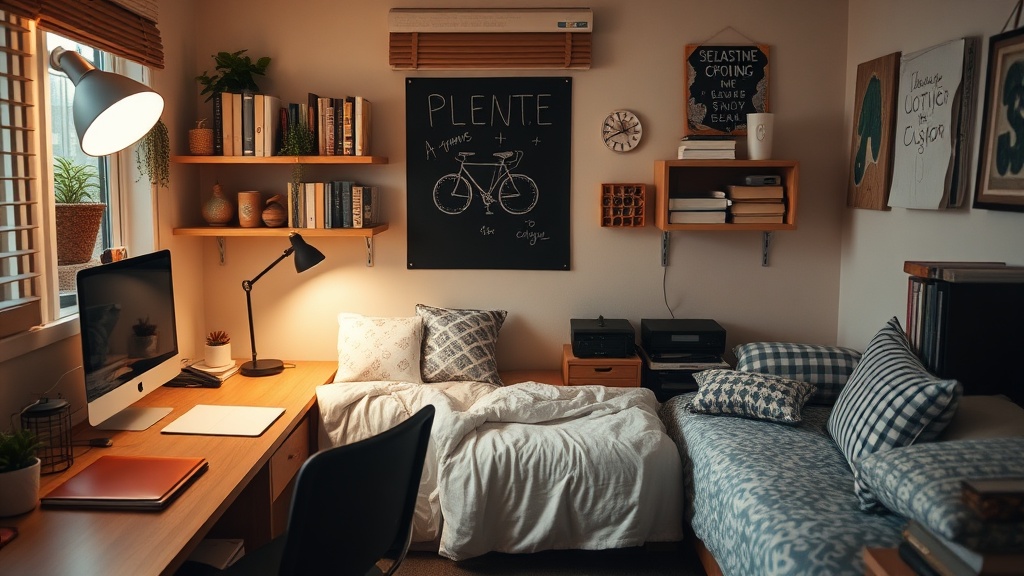
How to Create a Distraction-Free Study Zone in a Small Dorm Room

A cluttered desk and noisy roommate can sabotage even the best study intentions. This guide breaks down practical, affordable strategies for carving out a focused workspace in tight quarters—whether you're living in a triple at UC Berkeley or a cramped apartment near Laney College. You'll learn how to arrange furniture, block digital distractions, and build routines that signal your brain it's time to work.
How Can You Maximize a Tiny Desk for Serious Studying?
Start with vertical space. Dorm desks typically measure 24 by 48 inches—barely enough for a laptop and a coffee cup. Mount a pegboard (IKEA SKÅDIS works well) above the desk to keep notebooks, headphones, and charging cables off the surface. The goal is clear sightlines across the workspace.
Lighting matters more than most students realize. Harsh overhead fluorescents trigger headaches. A dimmable LED desk lamp—BenQ's ScreenBar Series clips onto monitors without hogging space—reduces eye strain during late-night cram sessions. Position it to eliminate glare on the screen.
Chair choice isn't negotiable. Dining chairs wreck posture within an hour. The HON Exposure Mesh Task Chair offers lumbar support and adjustable height without the Herman Miller price tag. Your back will thank you during finals week.
Here's the thing about desk location: face away from high-traffic areas. Positioning your back to the door (or room entrance) invites interruptions. Instead, orient the desk toward a wall or window. If the layout forces you toward the room's center, hang a curtain or room divider behind the chair to create a psychological boundary.
Storage solutions should hide clutter, not display it. Fabric bins slide under lofted beds. Over-the-door organizers hold snacks and supplies. The mDesign Over Door Storage Organizer fits most standard dorm doors and costs under $25 on Amazon.
What Are the Best Ways to Block Noise in a Shared Living Space?
Noise-canceling headphones outperform white noise machines for most students. The Sony WH-1000XM5 or Bose QuietComfort Ultra filter out roommate conversations and hallway chatter. Play brown noise (deeper than white noise) through the Noisli web app or Spotify playlists designed for focus.
Physical barriers help too. Heavy curtains—think blackout panels from Target's Room Essentials line—absorb sound better than thin blinds. Position a bookshelf perpendicular to the wall to create a partial wall effect. Even a tall plant (snake plants are nearly indestructible) disrupts sound waves crossing the room.
The catch? You can't block everything. Schedule deep-focus work during naturally quiet hours—early mornings or late evenings when roommates sleep. Save lighter tasks (email, scheduling) for peak noise times.
Communication beats technology. Establish a door signal system with roommates: headphones on means "don't disturb unless it's urgent." A whiteboard outside the door displaying "Deep Work Until 4 PM" sets expectations. Most people respect clear boundaries when they're communicated upfront.
How Do You Minimize Digital Distractions Without Going Off-Grid?
Willpower fails. The apps designed to addict you—Instagram, TikTok, Twitter—employ psychologists to maximize engagement. Fighting that with self-discipline alone is like bringing a spoon to a knife fight. Instead, build friction into distraction pathways.
Website blockers work. Freedom syncs across devices and blocks social media, news sites, and games during scheduled sessions. Cold Turkey Blocker offers stricter enforcement—harder to disable when motivation wanes. Both cost less than one DoorDash order per month.
Phone placement is shockingly effective. Studies from the University of Texas at Austin show that merely having a smartphone nearby—even face-down and silent—reduces cognitive capacity. Charge it in a drawer across the room. Use a physical alarm clock (the Sharp Atomic Alarm Clock costs $15) so you don't need the phone bedside.
Notification hygiene takes ten minutes and saves hours. Disable all non-human notifications. Your apps don't deserve your attention—the people texting you do. Here's what to keep: messages, calls, and banking alerts. Everything else goes. That said, some students need Slack or Teams for group projects—schedule specific check-in times rather than staying constantly available.
Consider the "distraction pad" technique. Keep a small notebook beside the computer. When a non-urgent thought intrudes ("need to order more protein powder"), jot it down instead of acting immediately. Process the list during designated breaks.
Comparison: Study Zone Setup Options by Budget
| Item | Budget Option (<$30) | Mid-Range ($30-$100) | Premium (>$100) |
|---|---|---|---|
| Desk Lamp | TaoTronics LED Desk Lamp ($25) | BenQ WiT Desk Lamp ($89) | Dyson Solarcycle Morph ($450) |
| Chair | Dorm-provided chair + cushion | HON Exposure Mesh ($85) | Herman Miller Aeron (refurbished $600+) |
| Noise Control | 3M foam earplugs ($5) | Anker Soundcore Life Q30 ($80) | Sony WH-1000XM5 ($400) |
| Storage | Shoe boxes under bed | IRIS Under Bed Storage ($25) | Custom closet system ($200+) |
| Website Blocking | Browser extension (free) | Freedom annual plan ($40/year) | Freedom + separate study device |
Worth noting: you don't need premium gear to build an effective study zone. The budget column works fine—many straight-A students write papers at kitchen tables with dollar-store earplugs. Equipment helps, but consistency matters more.
How Can Routines Reinforce Your Study Space?
Environmental cues trigger mental states. When you consistently use a specific location for focused work, your brain begins shifting into "study mode" upon entering that space. This phenomenon—context-dependent memory—works in your favor when boundaries are clear.
Create a startup ritual. Before opening textbooks, perform the same three to five actions: hang headphones, fill water bottle, set phone in drawer, open noise app. Repeat this sequence every session. Within two weeks, the ritual itself induces focus.
The opposite matters too: a shutdown routine. When study time ends, clear the desk surface, close all browser tabs, and physically leave the space. This separation prevents work from bleeding into relaxation time—which, paradoxically, improves both.
Here's a practical scheduling approach borrowed from Cal Newport's "Deep Work": block 90-minute focus sessions followed by 20-minute breaks. During breaks, leave the study zone entirely. Walk to the common room, grab coffee from Blue Bottle (Oakland's Telegraph Avenue location sits near several student apartments), or stretch outside. Physical movement resets attention.
How Do You Maintain the Zone When Roommates Don't Cooperate?
Not every living situation allows perfect control. Sometimes the roommate plays video games at 2 AM. Sometimes the walls are paper-thin and your neighbor practices trombone. Adaptation beats perfectionism.
Scout alternative locations. Campus libraries offer carrels and study pods—reserve them through your university's website. Coffee shops work for some students (the ambient chatter actually helps certain personality types focus), though the cost of daily lattes adds up fast. The Oakland Public Library Main Branch downtown provides free, quiet workspace with WiFi.
Negotiate with roommates using specific requests, not vague complaints. "Be quiet" fails. "Can we agree no video calls from the room between 7 and 9 PM on Tuesdays and Thursdays?" succeeds. Propose trade-offs: you'll handle trash duty in exchange for guaranteed quiet hours.
Portable focus tools bridge gaps. A foldable laptop stand (the Nexstand K2 collapses to 14 inches) lets you work comfortably from bed when the desk area isn't available. Noise-canceling earbuds slip into a pocket for library trips. The study zone becomes a mental state you carry, not just a physical location.
Track what actually works. After two weeks, evaluate: When were you most productive? Where? What preceded those sessions? Double down on the patterns that correlate with good output. Cut the rest. Your optimal setup differs from your roommate's—and that's fine.
The dorm room will never be a pristine library carrel. But with strategic arrangement, the right tools, and consistent boundaries, it becomes functional. Start with one change today: move the phone charger. Hang the headphones. Block Instagram for an hour. Small wins compound. Before midterms hit, you'll have a workspace that actually works.
Steps
- 1
Declutter and designate a specific study area
- 2
Optimize lighting and minimize visual distractions
- 3
Establish study rituals and boundary signals